File Converter
For creators who need a file in another format, such as a video's audio as an MP3, an iPhone photo as a JPG or a spreadsheet as CSV, and would rather not upload it to a conversion site. Conversions run on the visitor's device.
- Category
- Creative tool
- Status
- Live
- Role
- Design and development
- Year
- 2026
Overview
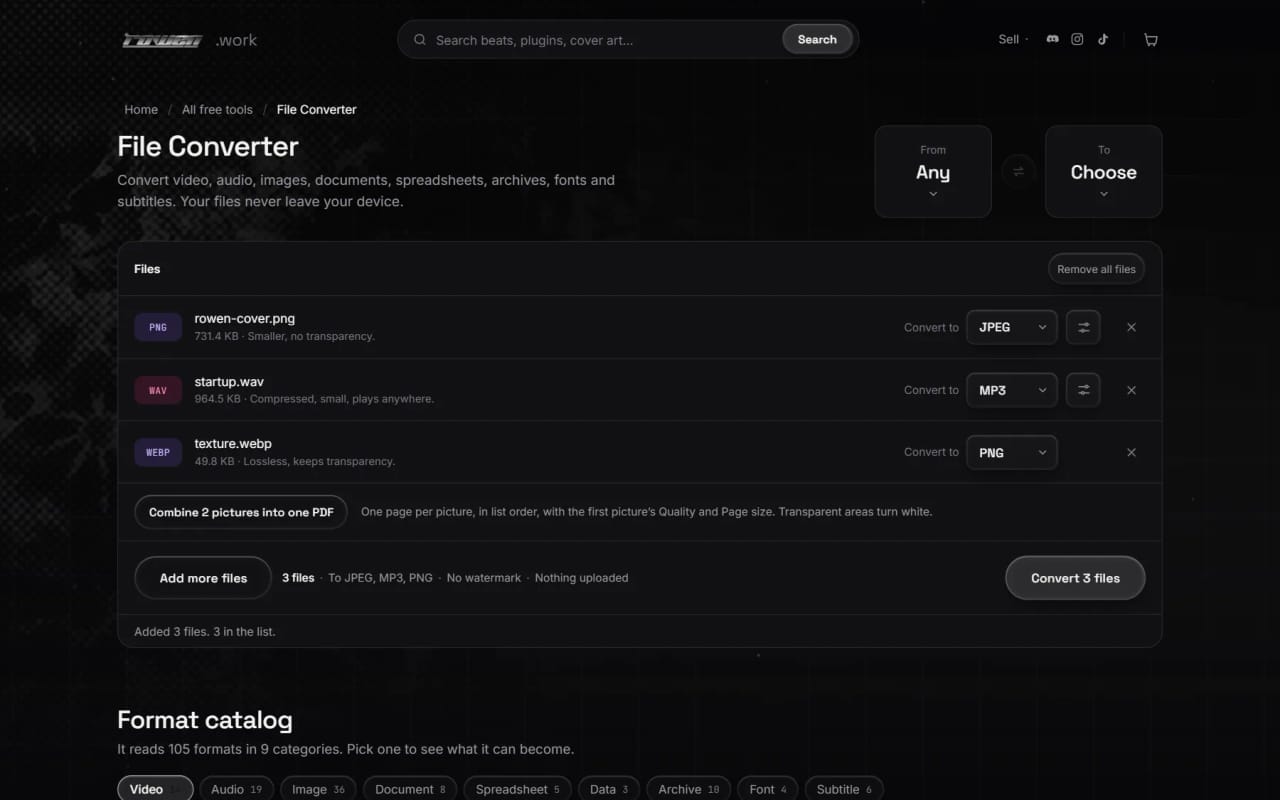
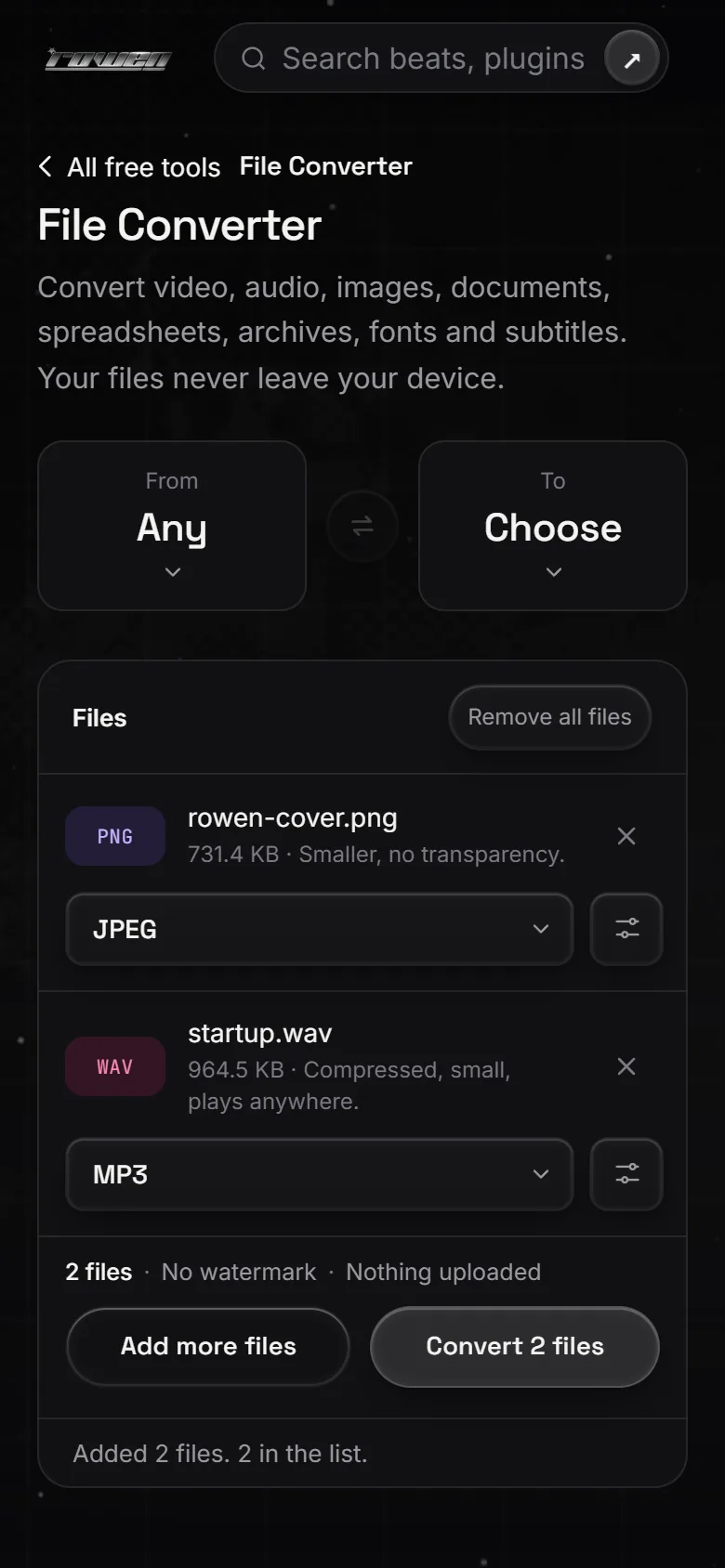
File Converter reads 105 formats in nine categories and offers 1,112 input-to-output conversions between them, from MP4 to MP3 and HEIC to JPG to Excel to CSV and SRT to VTT. Files go into one list, each with its own target format and settings, and one button converts them in turn.
The browser's own decoders and encoders handle every job they can, so a WAV to MP3 or a PNG to JPEG downloads nothing extra. Other jobs go to engines that run on the device and are downloaded only the first time a file needs one: FFmpeg for video and less common audio, ImageMagick for formats such as HEIC, PSD and camera RAW, pdf.js for PDFs, 7-Zip for archives, and smaller readers for fonts, Word files, spreadsheets and YAML. Each row says which engine it needs and how big it is before converting.
Formats with no browser library are written by hand in the site's own code: a PDF writer, DOCX, ODT and EPUB writers, RTF in and out, ZIP, TAR and gzip, WOFF and six subtitle formats.
What it does
Any supported format to another
105 formats across video, audio, images, documents, spreadsheets, data, archives, fonts and subtitles. A From and To pair at the top narrows the choice, and a format catalog under the converter shows what each format can become.
A batch list with per-file settings
Each file gets its own Convert to picker and settings panel, and a setting can be copied to the other files in one click. Files convert one at a time with a Stop after this file option, and finished files download one by one or all together as a ZIP.
Video and audio
Settings include trimming, video size and quality, muting, GIF width and frame rate, a still frame at a chosen time, and audio bitrate, sample rate and channels. When the target can hold a video stream as it is, the stream is copied instead of re-encoded.
Pictures, including camera formats
HEIC, TIFF, PSD, TGA, JPEG XL, JPEG 2000, EXR and camera RAW files convert to PNG, JPEG, WebP, AVIF, GIF and more. Photos are turned the right way up, and several pictures can be combined into one PDF.
Documents, spreadsheets and data
DOCX, ODT, EPUB, RTF, Markdown, HTML, plain text and PDF text convert into each other through one shared document model. PDF pages export as PNG or JPEG. XLSX, XLS, ODS, CSV and TSV convert between each other and to JSON, YAML, XML, Markdown or HTML tables.
Archives, fonts and subtitles
ZIP, 7Z, RAR, TAR, GZ, BZ2 and XZ archives repack as ZIP, 7Z, TAR or TAR.GZ. Fonts convert between TTF, OTF, WOFF and WOFF2, offering only the desktop format a web font really contains. Subtitles in SRT, VTT, ASS, SSA, SBV and LRC convert to other subtitle formats or plain text.
Clear about every download
Each row states the engine and its size before converting and shows download progress while it loads. A credits line under the catalog names every engine and its licence.
How it was built
Native first, engines on demand
The browser path runs first, and each heavy engine lives in its own Web Worker, loaded from a pinned version on jsDelivr only when a file needs it and then kept by the browser's cache. Engine sizes are stored in code for the progress bar because the CDN serves compressed files. SheetJS is vendored with a recorded SHA-256 because the fixed releases aren't published on npm.
One catalog drives the page
A single core file holds the format list, the targets each format can become, the engine each pair needs, the settings it reads and the FFmpeg command it builds. The picker, the catalog, the format counts and the settings panel all read those tables, which are tested in Node, so adding a conversion means one table entry and one branch in the engine code.
Fast where possible, safe when not
With video quality on Best, a stream the target can hold is copied, which is instant and lossless; MP4 and MOV only copy H.264 or HEVC with AAC so the result plays in browsers, and a failed copy is retried as a re-encode. WebM is written as VP8 because VP9 crashed inside ffmpeg.wasm. After any error or cancel the engine's worker is thrown away and the next job starts fresh, because its state can no longer be trusted.
Keeping the sound and the tab intact
Audio is decoded in an OfflineAudioContext at the file's own sample rate, read from its header, so a 44.1 kHz file isn't silently resampled. Files convert one at a time so phones don't run out of memory, archive unpacking stops at 1 GB or 20,000 files to guard against archive bombs, and pdf.js renders with the print intent so a conversion doesn't stall in a background tab.
Built with
- ffmpeg.wasm
- magick-wasm
- pdf.js
- 7z-wasm
- wawoff2
- mammoth
- SheetJS
- js-yaml
- lamejs
- Web Workers
- WebAssembly
- Compression Streams
Want something like File Converter?
Tell me what you are building and what it needs to do. rowenapichardo@gmail.com