3D Logo Generator
For artists, streamers, producers and small brands who want a 3D version of a flat logo for a banner, an intro or a mockup without learning 3D software. Everything runs in the browser and every export is free.
- Category
- Creative tool
- Status
- Live
- Role
- Design and development
- Year
- 2026
Overview
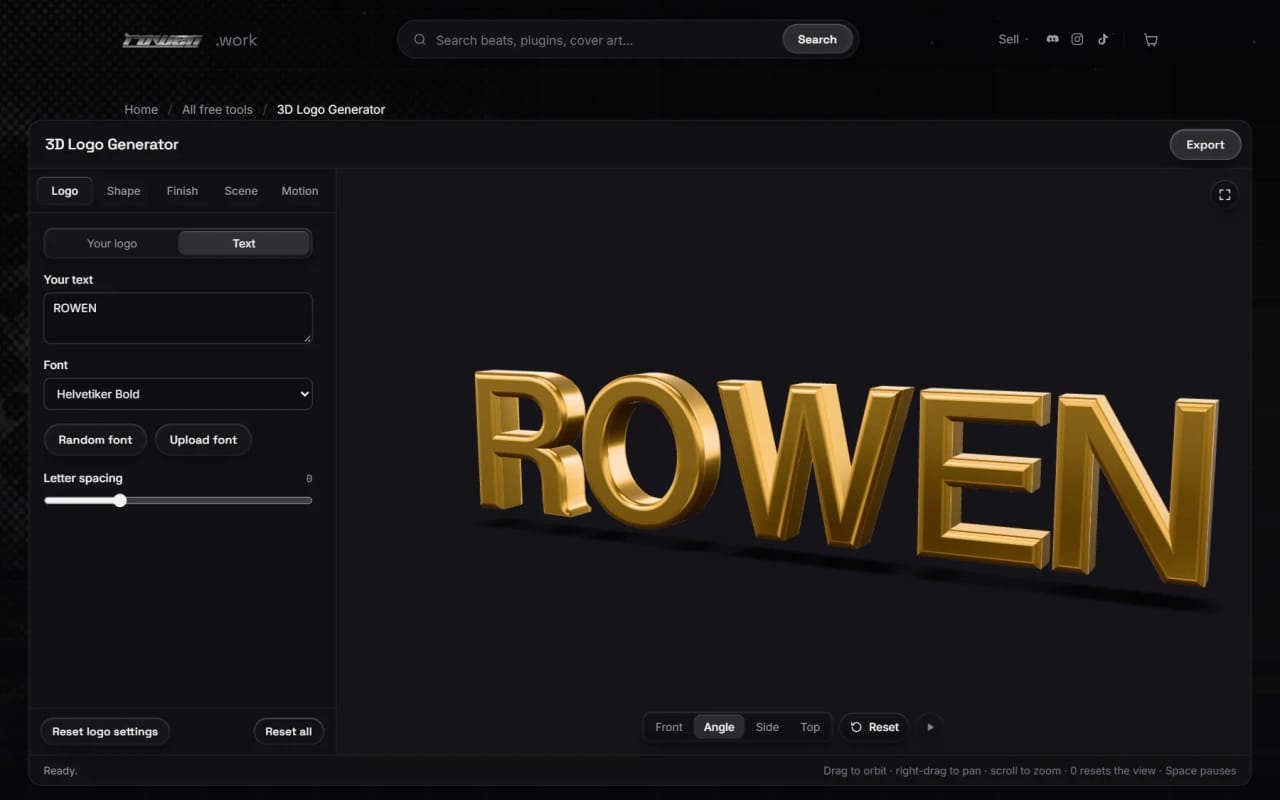
The 3D Logo Generator takes a PNG, JPEG, WebP or SVG logo, or a word set in one of 38 bundled fonts, and builds real extruded geometry with a rounded or chamfered bevel. The depth comes from the extrusion and bevel settings, not from the picture: the tool traces the logo's outline and raises its flat colours.
The model can be lit with seven studio lighting presets and given one of fifteen finishes, from chrome and gold to glass, neon and holographic film. It can sit over the visitor's own background picture for a mockup, and seven animations (still, turntable, 360° spin, swing, float, reveal and flip) loop cleanly.
Exports cover still images up to 8192 px (PNG and WebP can be transparent), MP4, WebM and transparent animated PNG video, and GLB, glTF, USDZ and STL models. Nothing is uploaded; tracing, meshing, rendering and encoding all happen on the device.
What it does
Clean tracing with holes
Uploads are traced into smooth outlines that keep letter counters and other holes open, bring back sharp corners and drop stray specks. Images without transparency are separated from their background, gradients included, and a note under the upload says how confident the trace is. SVGs stay vectors where they can.
Three ways to use colour
Logo colors raises each flat colour as its own piece of geometry. One finish gives the whole logo the material chosen in the Finish tab. Printed puts the original artwork on the face and uses the finish for the edges, which is the mode for logos with gradients or photo detail.
Text in 38 fonts
Typed text is built from each font's outlines, and glyphs that join or overlap are merged into single clean shapes. A random font button picks another bundled font.
Shape controls that protect thin details
Thickness, bevel width, bevel depth and an edge shape slider that blends from a flat chamfer to a fully round edge. Thin strokes and tight gaps get a narrower bevel automatically, and the Shape tab reports how much of the outline was narrowed.
Finishes and studio lighting
Fifteen finishes including chrome, brushed metal, gold, glass, frosted glass, neon, pearlescent and holographic, plus metalness, roughness and reflection controls. Visitors can add their own colour, roughness and normal maps. Seven lighting presets, a contact shadow and an optional glow for emissive finishes.
Background pictures for mockups
A visitor's own PNG, JPEG or WebP can sit behind the logo, fitted by cover, contain or stretch, dragged into place and adjusted for blur, brightness, contrast and saturation. With a picture loaded, the preview takes the exact shape of the export, so what is composed is what downloads. The picture is only the visible background; reflections keep the studio lighting.
Animation and export
Seven looping animations at 24, 30 or 60 fps, exported as MP4, WebM or transparent animated PNG. Stills export at preset sizes from 1080p to 4K, squares, portrait and story, or a custom size up to 8192 px. Models export as GLB or glTF with the animation, USDZ for Apple AR, or STL for 3D printing.
An editor that keeps the preview in view
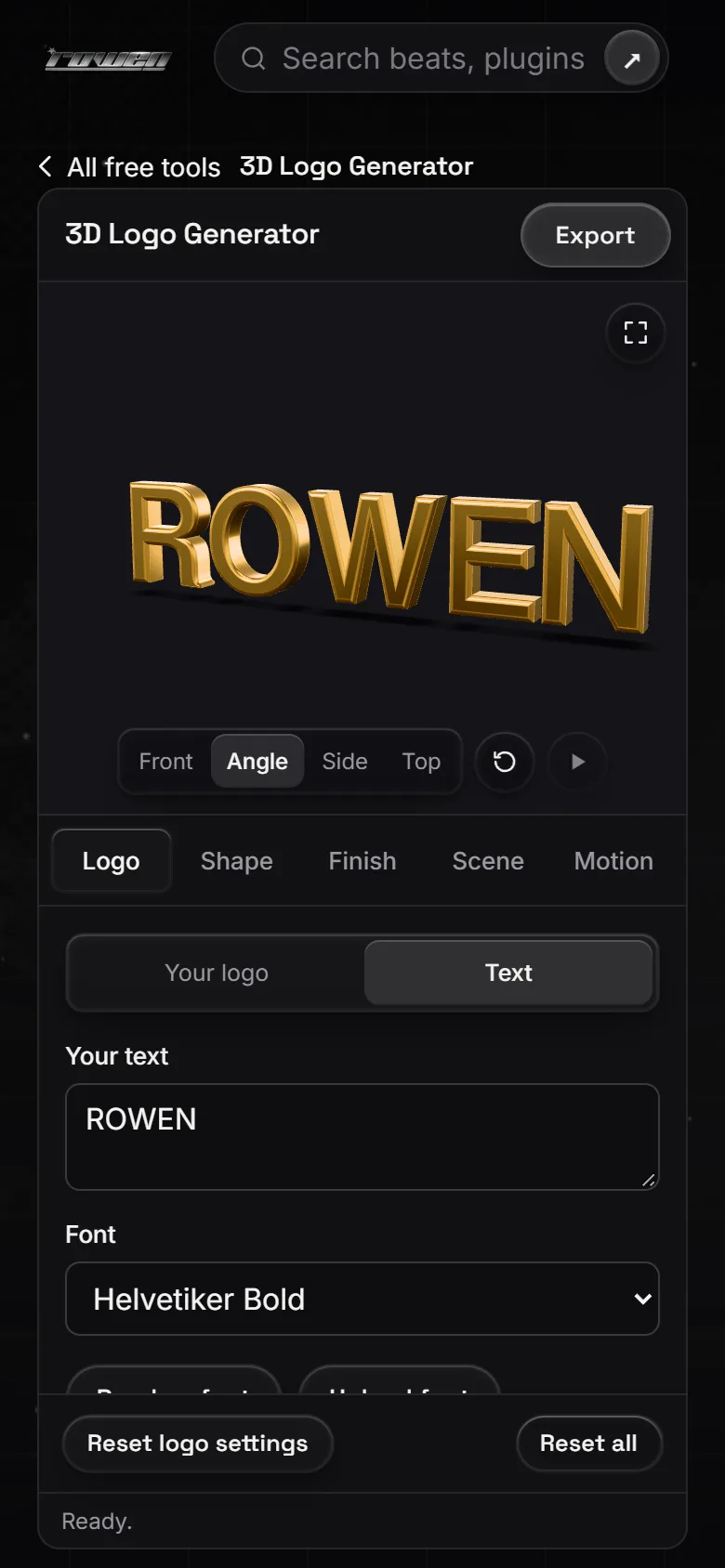
Settings sit in a sidebar with Logo, Shape, Finish, Scene and Motion tabs that scroll on their own beside a viewport sized to the window; on phones the preview sits on top and the settings scroll beneath it. Orbit, pan and zoom, four camera views and a full-screen mode.
Screens
How it was built
From pixels to clean outlines
Each image becomes a coverage field: alpha where there is transparency, otherwise distance from a background estimated from the four borders, so gradients and vignettes are followed. Marching squares interpolated between pixel centres gives sub-pixel edges with no staircases, corners are rebuilt from the tangent lines on either side, and Taubin smoothing and Douglas-Peucker simplification remove jitter without shrinking the shape. Colours are clustered in Lab space, and each patch of another colour inside a region becomes a raised layer. Tracing runs in a Web Worker so the page stays responsive.
An inward bevel that stays watertight
The bevel is cut into the outline, so the silhouette from the front is exactly the traced shape. Every outline vertex moves inward along its miter by its own distance, which shrinks until the point stays clear of the other side of a stroke, a neighbouring letter or a hole. Repair passes catch crossings, and the flat face is accepted only when its triangulation matches the polygon's area and uses every outline edge. Tests check that every bundled and library font builds watertight, correctly wound meshes.
Rebuilding while a slider moves
Mesh building is split in two: the costly flat work (outlines, miter frames, insets, face triangulation) is cached per bevel width, and only the rings and walls are rebuilt for thickness, depth and edge shape. Builds run in a module worker, return typed arrays by transfer, and newer settings replace any waiting build, so a dragged slider always ends on its final value. Finishes, lighting and motion update materials in place and never rebuild geometry or recompile shaders.
Every frame a function of time
Animations are pure functions of time shared by the preview, the video export and the glTF keyframes, so every exported frame matches the preview. MP4 is encoded with WebCodecs (H.264) and muxed by the site's own motion editor exporter, and background placement is stored as fractions of the frame, so a preview and a 4K export of the same shape line up.
Built with
- Three.js 0.180
- WebGL
- earcut
- polygon-clipping
- OpenType.js
- fflate
- Web Workers
- WebCodecs
- MediaRecorder
- node:test
Want something like 3D Logo Generator?
Tell me what you are building and what it needs to do. rowenapichardo@gmail.com