Motion
For making short vertical, square and landscape ads without installing a video editor. Projects and uploads are saved in the browser, and the export is rendered on the device.
- Category
- Web app
- Status
- Live, in progress
- Role
- Design and development
- Year
- 2026
Overview
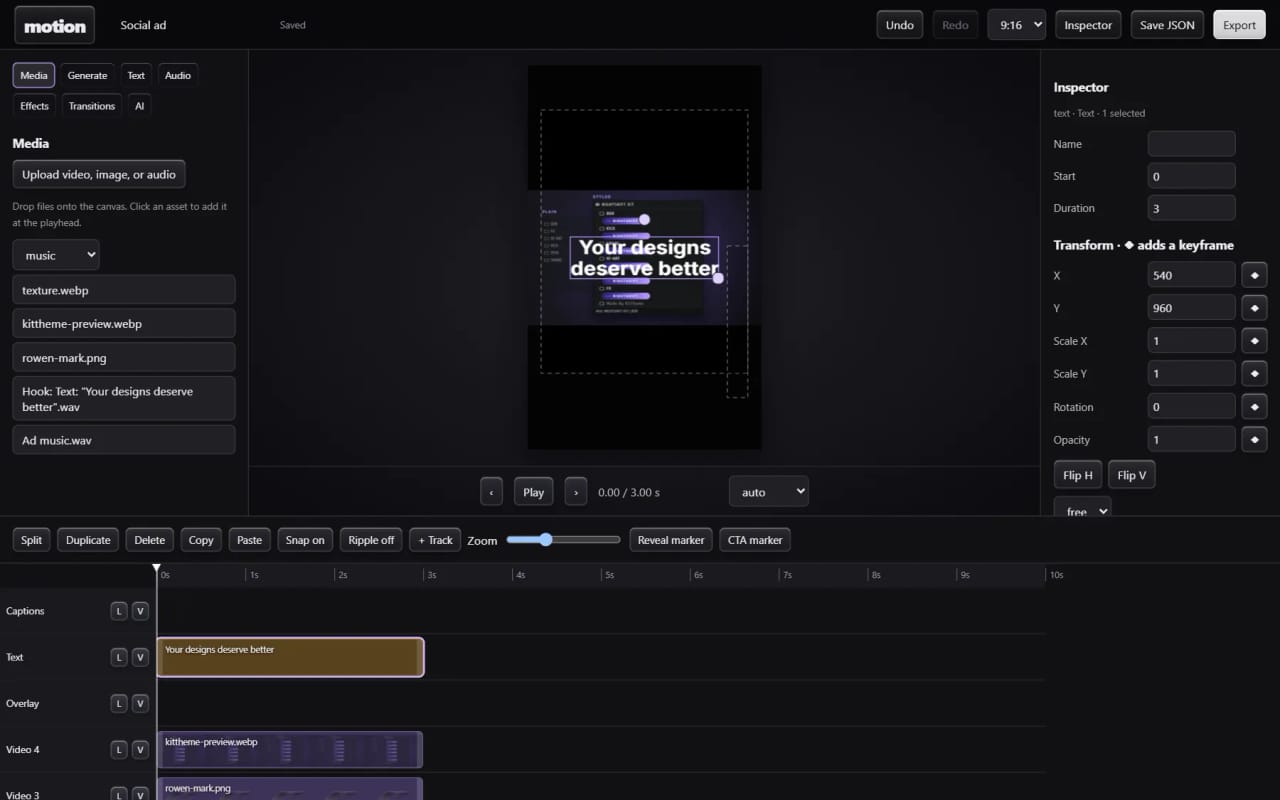
Motion is a multitrack video editor that runs in the browser. Video, pictures, text and audio sit on a timeline; visual items are moved, scaled and rotated directly on the canvas; keyed properties animate with eased keyframes; and transitions join clips that touch. Projects save automatically in the browser.
Sound is built into the editor. A local Web Audio synthesizer generates music and sound effects from the edit itself, reading clip boundaries, text and reveal or CTA markers so risers and impacts land on those moments. The mix ducks music under voice and primary hits and is mastered to about -14 LUFS, and the export renders the same picture and sound as the preview into an H.264 and AAC MP4 with WebCodecs.
An ad generator at /motion#ads builds short ads for KitTheme, the free tools and rowen.work from real captures of those pages, using only results the tools actually computed. Motion is still in progress: captions, graphical curve editing and track heights are not built yet, and browser testing so far has been in Edge.
What it does
Multitrack timeline
Clips drag across tracks, trim, split, duplicate, copy and paste, with snapping, optional ripple edits, zoom, waveforms and video filmstrips. Tracks can be muted, soloed, locked or hidden.
Canvas editing and keyframes
Items are selected on the canvas to move, scale and rotate, and the inspector adds crop, opacity, flips, text styling and stacking order. Once a property has a keyframe, changing it adds another at the playhead with linear, ease or hold curves, and audio volume uses the same keyframes.
Transitions and animation presets
Ten transition types, including crossfade, wipe, push, zoom, whip and glitch, plus in and out animation presets for text and pictures. Safety guides for TikTok, Reels and Shorts show in the preview only.
Sound generated from the edit
Music in selectable styles and sound effects from named recipes are synthesized locally from the edit's timing, with no samples and no paid service. Each sound lands as its own editable WAV clip and can be regenerated or replaced on its own.
Frame-exact MP4 export
Exports H.264 and AAC MP4 in 9:16, 16:9, 1:1 or 4:5 at 24, 30 or 60 fps, plays the result in the export dialog for a check, and can be cancelled without touching the project. Browsers without WebCodecs H.264 get a labeled real-time WebM instead.
Ad generator
At /motion#ads a product, ad type, length, format and platform become a scene plan whose cuts sit on the music's beat grid. Every product shot is a capture of the real page, platform safe zones can be shaded, and export goes through the editor's own MP4 exporter.
AI edits and drafts (optional)
A typed command such as moving the logo to six seconds becomes operations from the editor's own catalogue and applies as one undo step; if any part of the answer is invalid, nothing is applied. An AI draft builds an editable first cut from uploaded media and title cards. Both run only when a server-side AI provider is set up.
Screens
How it was built
One renderer for preview and export
Every frame is a pure function of the project and the time. The same compositor draws the preview and the export, grain and glitch are seeded by the frame index so two renders give the same pixels, and export seeks each video source to the exact frame instead of playing it. Effects run in WebGL2 with a canvas-filter fallback.
MP4 written in the browser
WebCodecs encodes H.264 and AAC, and a small in-house MP4 writer puts the index first and uses an edit list to remove the AAC encoder's priming samples. That delay is measured by decoding a probe signal, so sound starts on video frame 0. The exporter reads its own file back to check the sample tables, keeps about one frame in memory at a time, and retries a failing video encoder once per remaining supported configuration.
AI limited to the editor's own operations
The edit request sends the model the editor's catalogue of 51 operations and a compact project summary and asks for strict JSON. The server rejects any operation outside the catalogue, any id that isn't in the summary and oversized arguments; the browser then refuses the whole answer if anything was rejected or the project changed during the request. Provider keys stay on the server, request bodies are never logged, and usage is rate-limited per visitor with site-wide daily caps.
Sound cued from the picture
A cue sheet reads clip boundaries, text, animation metadata and reveal or CTA markers, drops redundant nearby sounds, and separates when a sound starts from when it should hit, so a riser ends exactly as the reveal lands. Regeneration ignores sounds it generated earlier, so old clips can't suppress new cues.
Built with
- ES modules, no framework
- Canvas 2D
- WebGL2
- WebCodecs
- Web Audio API
- MediaRecorder
- IndexedDB
- Vercel Functions
- Vercel KV
- Groq API
Want something like Motion?
Tell me what you are building and what it needs to do. rowenapichardo@gmail.com